A polished, generous notetaker that gets recordings, summaries and CRM notes right. It does not suggest what to say during the call, so it belongs in the notetaker category rather than live assistance. Many teams will happily run it alongside a live tool.
What Fathom is
Fathom records meetings on Mac and Windows computers. In its original mode a Fathom notetaker joins the call as a participant and captures video, audio and a searchable transcript, joining automatically once your calendar is connected. A newer bot-free mode captures the meeting from the computer without a participant in the call; at the time of writing the vendor says this is available on Mac only, with Windows to follow. Supported meeting apps are Zoom, Google Meet and Microsoft Teams via a standard meeting link, plus Slack huddles. Phone calls and webinars are not supported.
During the call
Fathom transcribes in real time and shows a live summary that follows the conversation, so a participant who joins late or drifts off can catch up on what has been said. That is the extent of its in-call behaviour in the documentation we reviewed. There is no feature that listens for a question and proposes an answer, no objection card, and no company knowledge base for it to draw from. Fathom is a very good witness to the call rather than a participant in it.
After the call
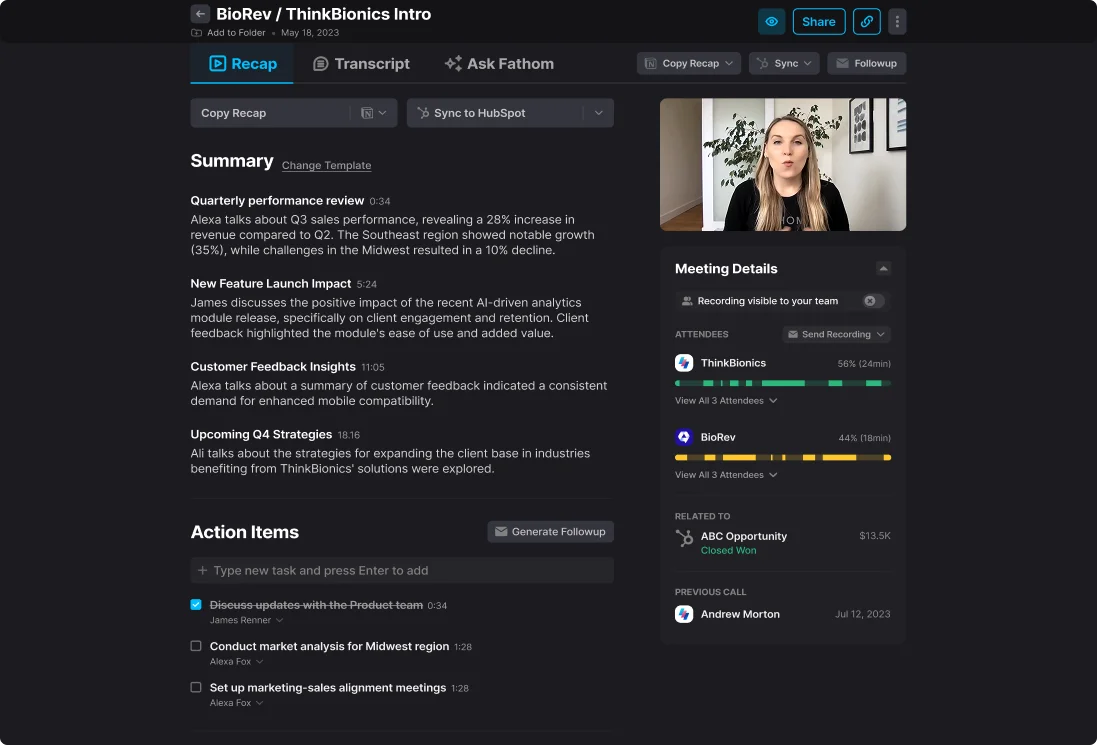
This is where Fathom earns its reputation. A full recap with action items arrives as the meeting ends. Summaries can be tailored by template, recordings are searchable, and “Ask Fathom” lets you query recordings for decisions, objections and competitor mentions. On business plans, CRM sync to Salesforce and HubSpot can update records automatically, and a deal view plus coaching metrics and AI scorecards give managers something to work with. Team plans add shared folders, playlists, comments and keyword alerts.
Pricing
Fathom’s pricing page, when we checked it, listed a free plan with unlimited recordings and transcriptions and instant AI summaries; a Premium plan at $20 per month or $16 per month billed annually; a Team plan at $19 or $15 per user per month with a two-user minimum; a Business plan at $34 or $25 per user per month, also with a two-user minimum, which is where CRM field sync, deal view and scorecards live; and a custom Enterprise plan with single sign-on and retention controls. Prices change, so confirm on the vendor page.
Limits to know
- No live suggestions, objection handling or factual answers during the call.
- Bot-free recording is Mac only at the time of writing.
- No place to upload your own product or pricing material.
- Automatic CRM sync is reserved for the Business tier and above.
Who should choose it
Teams whose main problem is the admin after the call: notes, action items, a CRM update. Fathom handles that at low cost and with little setup, and the free plan makes it easy to try. If the problem is what happens during the call, a notetaker will not fix it. Compare SalesGhost for sourced live answers or Cluely for a general live assistant. Teams wanting team-wide analytics should look at Gong. The benefits page describes what a live tool adds on top of a notetaker.
Sources
Official pages, checked on 24 September 2026.
- Fathom homepage fathom.ai
- Fathom: Product overview fathom.ai
- Fathom help: Supported devices and platforms help.fathom.video
- Fathom: Video conferencing integrations fathom.ai
- Fathom pricing fathom.ai