
The word “live” is the whole point. Plenty of sales software uses AI, and much of it touches calls. Recording bots transcribe. Conversation intelligence platforms score and summarise. Outbound tools write emails. All of that happens before the call or after it. A live assistant is measured on what it can do in the next few seconds, while the prospect is still waiting for an answer.
How a live assistant works
The products in this category share a common loop, even where the interfaces differ.
- Listen. The assistant captures the call audio. Desktop overlays do this on the rep’s own computer, usually as two streams: the microphone and the system audio carrying the other participants. Bot-based tools instead join the meeting as a participant and listen from there.
- Transcribe and detect. Speech is transcribed continuously and the transcript is scanned for questions, objections, competitor names and technical terms.
- Retrieve. When a trigger fires, the assistant looks up an answer. The best implementations search material the company has approved, such as pricing sheets, security documents and product docs, and note which file the answer came from.
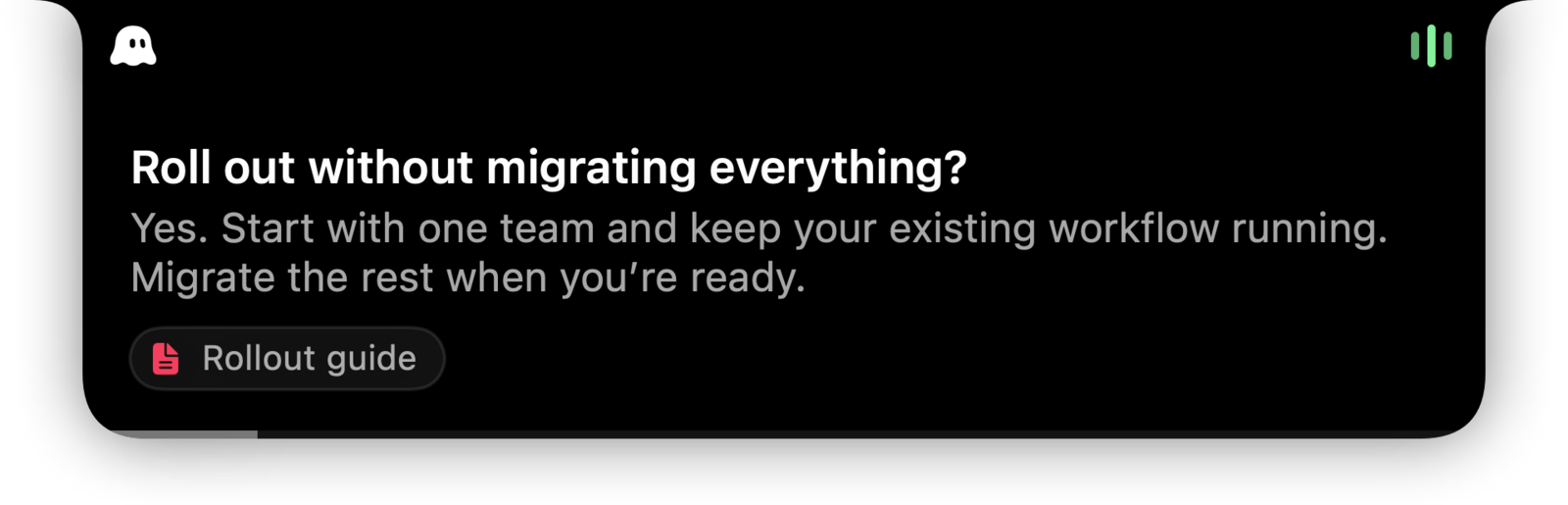
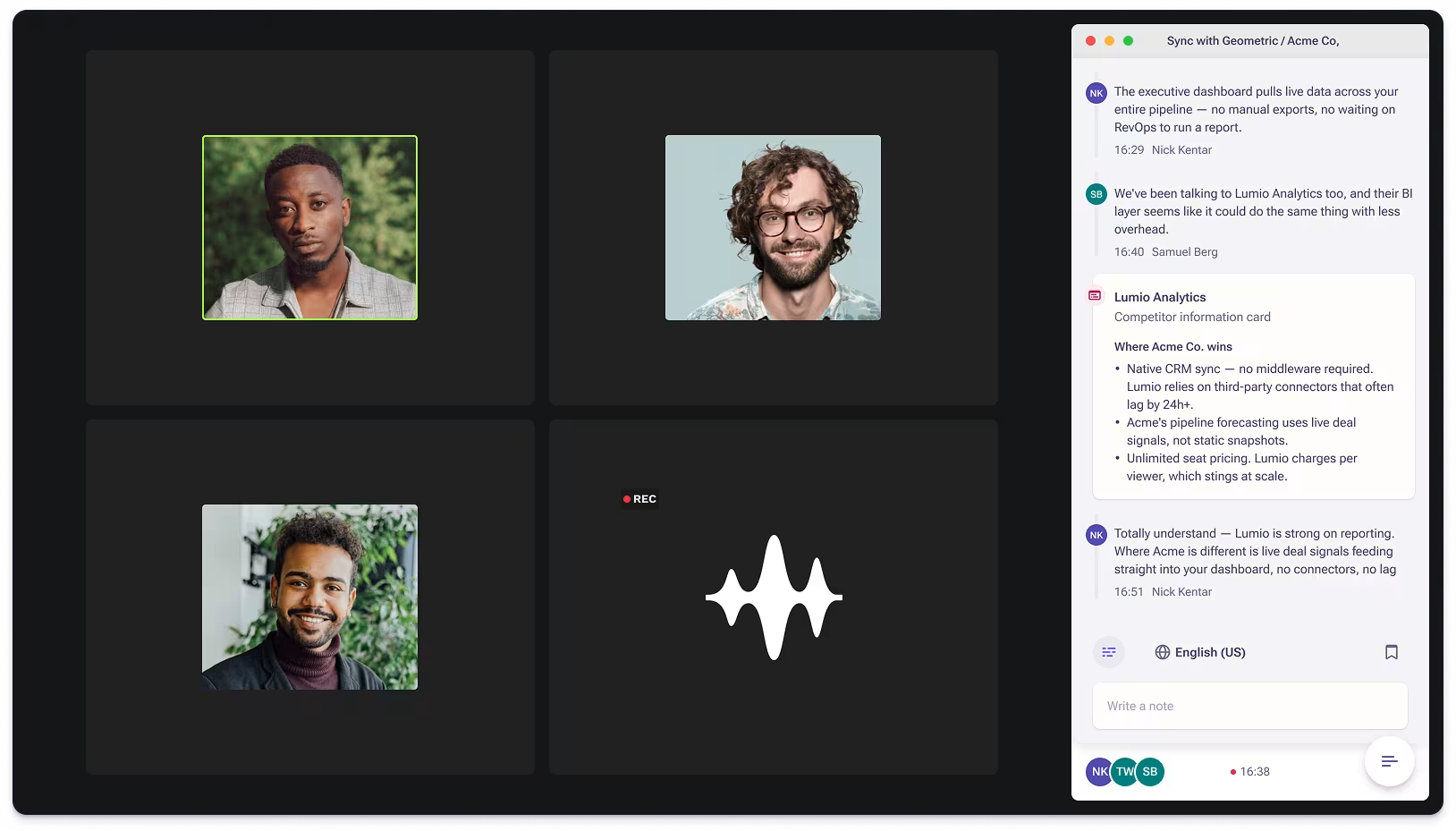
- Suggest. A short card appears for the rep: on a desktop overlay it sits on the rep’s own screen, while bot-based tools show it inside their meeting panel. It might be a factual answer, a way to handle the objection, a follow-up question, or a next step.
- Record and recap. After the call, the same transcript becomes a summary, action items, a follow-up email draft and a note for the CRM.
Two shapes the suggestion can take
The two images below are the vendors’ own. The first is a desktop overlay: SalesGhost’s answer panel opens below the Mac notch on the rep’s screen and names the document the answer came from. The second is the bot approach: Outreach Kaia joins the meeting as a participant and shows its transcript and content cards in a side panel.
What it is not
Three neighbouring categories get confused with live assistance. They are useful, but different.
- AI notetakers. Tools such as Fathom record the call, may show a live transcript or running summary, and deliver a recap afterwards. They do not tell the rep what to say.
- Conversation intelligence. Platforms such as Gong analyse recorded calls across the whole team: talk ratios, objection patterns, deal risk. Gong’s own assistant answers questions about a call on its call page, after the recording exists. Outreach Kaia overlaps with live assistance: a bot joins the meeting and shows live content cards, so it does help during the call, but it is sold as part of a broader engagement platform rather than as a standalone overlay.
- Outbound automation. Tools such as Instantly find leads and send email sequences. They happen before a conversation exists.
The directory sorts every tool we cover into one of these categories, so you can see which products are competing for the same job.
General meeting assistants versus sales-specific ones
Within live assistance there is a further split. General-purpose tools such as Cluely answer questions in any meeting, from interviews to lectures, and offer a sales mode on top. Sales-specific tools such as SalesGhost start from the rep’s problems: an objection library, competitor cards, CRM context before the call, and a follow-up ready when it ends. Neither approach is wrong. A founder doing every kind of call may prefer breadth. A team of account executives usually wants the sales workflow built in.
What to look for
- Where answers come from. An assistant that grounds its suggestions in your documents, and shows the source, is safer than one improvising from a general model. Ask whether web lookups are labelled as such.
- Latency. A suggestion that arrives after the rep has already answered is noise. Vendors describe response times differently; test against a real call before trusting any number.
- How it appears. Desktop overlays sit on the rep’s screen with nothing in the participant list. Bot-based tools are visible to everyone on the call, which some buyers prefer.
- Platform coverage. Check Mac and Windows support separately. Several tools ship features on one platform first.
- The after-call output. Recaps, next steps and CRM notes are where most of the time saving lands.
Who benefits most
New reps ramping on a complex product, anyone selling something with a long list of technical or compliance questions, and small teams without a sales engineer on every call. The benefits page goes through what improvements are realistic and which claims to treat with caution.
Ready to compare products? Start with the best live AI sales assistants, where we explain our criteria and our pick. If you want to see a sales-specific overlay in action, SalesGhost publishes a walkthrough of what happens during the call.
Sources
Official pages, checked on 24 September 2026.
- SalesGhost: During the call salesghost.app
- SalesGhost: Knowledge salesghost.app
- Cluely docs: Live Insights docs.cluely.com
- Outreach support: Kaia overview for end users support.outreach.io
- Gong help: Use Gong Assistant on the call page help.gong.io
- Fathom: Product overview fathom.ai